Video player · Windows 10/11 · x64

NARMOVION Video

A video player for Windows that opens what other players refuse. Every video format and audio codec FFmpeg can read, hardware decoding with a software fallback, and a quiet bronze-on-graphite interface.

WINDOWS 10/11 · x64FULL OFFLINE INSTALLERVERSION 2.2.0
CURRENT VERSION 2.2.0
One installer contains everything the program needs: Qt, FFmpeg and the other libraries. Download it, install, and play.
Installer: NARMOVION-Video-Setup-2.2.0-x64.exe · 18.9 MB
SHA-256: 97D7C036FEF822F71868FE81DE6F1590FBC6D767F0B198D1A3DD2FEC1343AE30
ZIP (21.9 MB) · SHA-256: 97CBE14B52B1C1AF5DF3F7A5E3D8D84FE142CACBB4787B6BDD9DA548FDDAB47D
What's new in 2.2.0
  • Chapters: marks on the seek bar, a Chapters list in the right-click menu, Shift+PgUp / Shift+PgDn to jump between them.
  • Repeat a stretch (A-B) with the backslash key; one player at a time: a second start hands its file to the open window.
  • If another program holds the sound device in exclusive mode, the sound plays through the Windows mixer instead of being lost; after a jump on a network drive the sound waits for its first data.
  • Choose English, Ukrainian, Polish, German, French or Spanish for the interface.
  • Return to the library directly from the video screen without stopping playback.
  • Open the current video selected in File Explorer or copy its full path from the playback menu.
  • Messages of the player (a busy sound device, file errors) are shown in the language of the window; a failed audio-track switch now records its reason in the log.
  • The Sound panel fits its column when the equalizer is boosted: the pre-gain note wraps (the equalizer bands and the On switch were cut off in some languages).
  • The side panels (Picture, Sound, Subtitles) fit a narrow column in every interface language; the offer to send a report is a slim row and appears only after real stutter, not after a jump.
  • Files on network drives are read ahead (a 32 MB buffer), so the pauses of the share do not stop the picture or the sound; the player notes stutter in its log and can offer a report.
  • AC-3 and DTS can be sent to a compatible AV receiver as IEC 61937 bitstream over WASAPI Exclusive.
  • If the receiver or output device refuses bitstream, playback automatically retries as decoded multichannel PCM.
  • The AV receiver setting now enables bitstream mode and bypasses sound effects that would alter encoded data.
Why Windows or the browser may warnThe installer is not signed with a paid code-signing certificate yet, so Windows SmartScreen or the browser can show a warning for a new file. Check the SHA-256 above against the file you downloaded. Inside the .zip the installer is the same file.
NARMOVION Video in a black and gold cinematic studio
ALL FORMATSEverything FFmpeg can read
HARDWARED3D11 decoding, software fallback
AV1 · HEVC · H.2644K, HDR, Dolby Vision files
WASAPIShared and exclusive audio

Library, player and tools in one window

Your folders, playlists, favorites and watch positions stay on your computer.
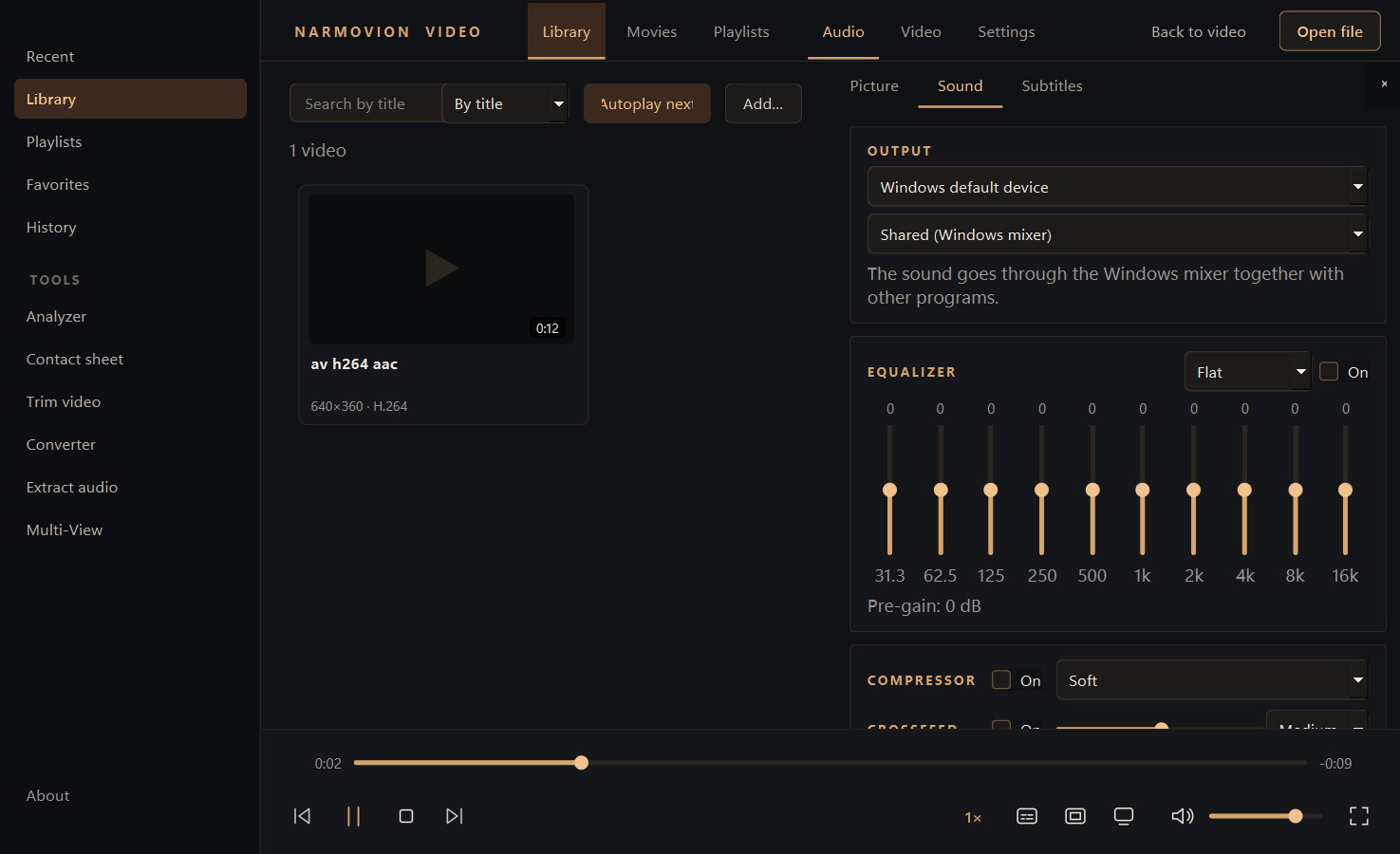
NARMOVION Video window with the library and the sound panel
NARMOVION Video interfaceDESKTOP / WINDOWS

Plays what others refuse

All formats and codecs

MKV, MP4, AVI, MOV, M2TS, WebM, and the rare ones. All audio codecs FFmpeg knows: AC-3, E-AC-3, DTS, TrueHD, FLAC, Opus and more.

Hardware decoding

Uses the graphics card (D3D11) for H.264, HEVC and AV1 when it can, and falls back to software without a stop. AV1 plays in software too.

Library and playlists

Add folders and drives, find a film, keep playlists and favorites, continue where you stopped. Previews appear on the seek bar.

Picture and sound

Fit, fill, original size and aspect modes; brightness and colour; a ten-band equalizer, compressor and crossfeed; choose the audio device.

Subtitles and tracks

Embedded and external subtitles, audio track switching without freezing the window, default language.

Tools

Analyzer, contact sheet, trim, converter, audio extraction and Multi-View, in the side panel.

Complete feature list
Playback and picture

Plays media supported by the included FFmpeg libraries. Hardware decoding through D3D11 is used when available, with software fallback. Includes frame stepping, seek previews, playback speed from 0.25× to 4× with pitch preservation, audio/video sync, fit/fill/stretch/original sizing, aspect-ratio presets, rotation, mirror, crop, picture adjustments, snapshots, and always-on-top mode. HDR output is enabled when Windows reports an active HDR display; SDR remains available as fallback.

Sound and receiver

Select audio tracks and output devices. WASAPI Shared, Auto / Direct, and Exclusive modes are available. AC-3 and DTS bitstreams can be sent as IEC 61937 to compatible AV receivers in Exclusive mode; if the device rejects bitstream, playback retries as decoded multichannel PCM. Includes a 10-band equalizer, compressor, limiter, crossfeed, ReplayGain, loudness and clipping controls.

Subtitles

Supports embedded text subtitles and bitmap PGS, DVD, and DVB subtitles, plus external SRT, ASS/SSA, WebVTT, MicroDVD, MPL2, and VobSub IDX/SUB. Choose a default subtitle language, adjust timing, size, colour, outline, background and placement; subtitle choices are remembered per file.

Library and home cinema

Scan folders and subfolders into a local library; browse recent, continue watching, favorites, playlists, and movie collections. Resume positions and watched state are remembered. Supports autoplay next, local poster artwork, large-card TV / remote navigation, keyboard and media keys, and seek-bar thumbnails.

Media tools

Inspect codecs, streams, HDR metadata, frame rate, bitrates, and decoder details; create contact sheets and snapshots; trim video, convert video, extract audio, compare multiple views, and open an image panel. Reports are only sent after review and confirmation.

Updates, languages, and privacy

Choose the interface language: English, Ukrainian, Polish, German, French or Spanish. Check for updates manually or automatically at startup; the player opens the download page and does not silently install updates. Videos, library contents, and viewing history remain local. Optional diagnostics are shown before sending.

Network drives are handled with care: seeking in a film on a network share is tuned to stay fast.

License and third-party software

NARMOVION Video is free of charge for personal and business use. You may share the unmodified installer for free; you may not sell it. It is not open source: you may not modify or take apart the program, except where the law or the licenses of the libraries allow it. The full text is shown by the installer and is installed with the program.
Third-party software: Qt 6.11.2 (LGPL-3.0) and FFmpeg 9.0.2 (LGPL-2.1 or later) are used as separate DLL files that you may replace with your own builds of the same libraries; dav1d 1.5.4 (BSD 2-Clause) decodes AV1; SQLite, PCRE2, double-conversion, md4c and zlib have permissive licenses. Licenses, notices and the written offer of the source code are installed with the program (Start menu → NARMOVION → Licenses and notices); the build recipe and the source code are sent on request through the support page.

What the player sends, and when

The player never uploads your videos, library or what you watch. When automatic update checks are enabled (on by default), it quietly checks this site on startup for the newest version; you can turn this off in Settings or in the Updates window. You can also check manually. Only the program version is sent in the request. If it crashes, or a jump in a film is very slow, or the picture sticks, it can offer a problem report. A report is sent only when you press Send, and the window shows you the whole text first: the version, facts about your computer (Windows, processor, memory, graphics), a short description of the file (format, codecs, size; its name only if you tick the box), the last lines of the player's own log with file names replaced by marks, and your comment. Your Windows user name is hidden. You can turn the offers off in Settings or save the report to a file.

Requirements

Windows 10 (version 1809) or Windows 11, 64-bit. A graphics card with Direct3D 11 for hardware decoding (without it the player decodes in software). About 60 MB of disk space.

Something does not play or works badly?

Open Settings → Send a report about a problem, or write to support.

Support ↗